Run your vendor portfolio
and third-party risk
with confidence
A practical guide for procurement, vendor management, and third-party risk teams. Manage your portfolio, run due diligence, map your supply chain, and keep your risk register current — all in one place.
Portfolio
One working list of every active vendor relationship.
Due diligence
Send, autofill, and track security questionnaires.
Supply chain
Map vendors, subcontractors, and concentration risk.
Risk register
Track and report third-party risk end to end.
This guide picks up where the basics leave off. It's written for the people who run the vendor program day to day — keeping the portfolio clean, due diligence moving, the supply chain visible, and risk under control.
You don't need to read it in order. Jump to whatever you're working on from the menu, and lean on the Ethira Agent whenever you'd rather ask than click.
New to Ethira? Start with the platform basics — signing in, navigation, the dashboard, and the Agent — then come back here for the procurement and TPRM workflows.
Your onboarded vendors
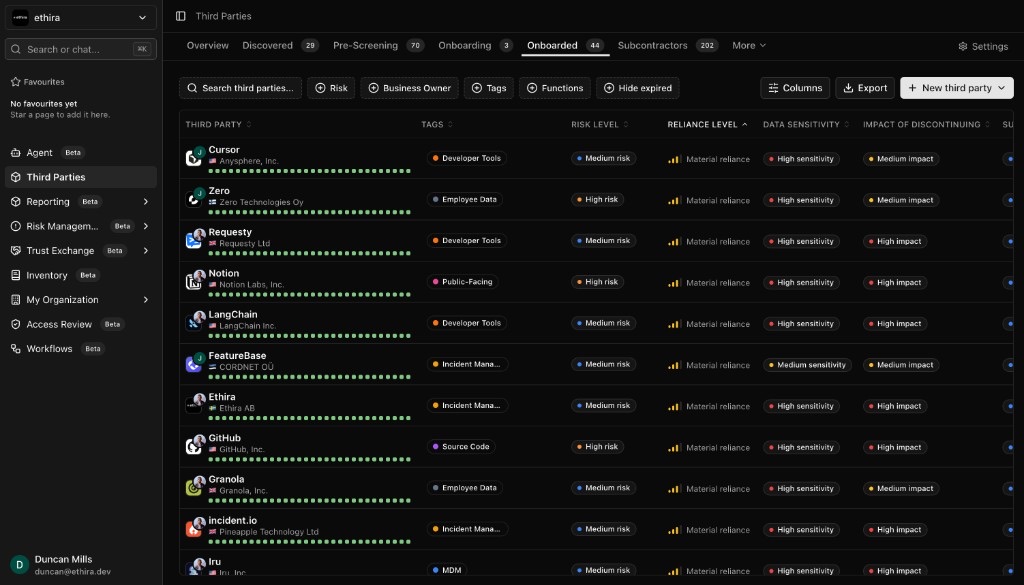
The Onboarded list is your command center — every active vendor relationship in one place. Find it under Third Parties → Onboarded.
Filter to exactly what you need
Use the filter bar above the table and combine as many as you like:
- Risk levelShow only Critical, High, Medium, or Low relationships.
- Business ownerNarrow to vendors owned by specific people.
- TagsInclude or exclude vendors by the tags you've applied.
- FunctionsShow vendors tied to selected business functions.
A filtered view is captured in the page link, so you can bookmark it or share it with a colleague and they'll see the same list.
Make the table yours
Select Columns to turn columns on or off and drag them into the order you prefer — owners, contract dates, risk level, tags, and more. Your layout is remembered for the workspace.
Group vendors with tags
Add tags to your vendors to organize your portfolio into cohorts — by region, criticality, or however your team thinks. Then filter the list by tag to work a whole group at once. Tags also carry through to your Excel exports.
Reassessments & ownership
Keep every vendor current
Set how often vendors at each risk level should be re-checked, and Ethira shows a live countdown under each vendor so nothing quietly goes stale.
- Go to Third Parties → Settings and open Vendor Reassessment Schedule.
- For each risk level, set a cadence in months — or mark it as no reassessment needed.
- Select Save. New vendors pick up a reassessment date automatically based on their risk level.
When a vendor has less than a month to go, the countdown switches to days so it's easy to spot what's coming due.
Make accountability clear
Give every relationship a business owner so it's always obvious who's responsible. Set it right from the owner column in the list, or from the vendor's profile. Owners show up in your lists, in the relationship header, and in every export — handy for access reviews and audits.
Remove a vendor
When a relationship is truly closed — or a record was created in error — you can delete it from your portfolio.
- On the Onboarded list, scroll to the far right of the vendor's row and open the ⋮ menu.
- Choose Delete vendor.
- Type the vendor's name to confirm, then select Delete vendor again.
Safety first. Deleting permanently removes the relationship and everything tied to it — risks, mitigations, certifications, and documents. You'll be asked to type the vendor's name to confirm, and it can't be undone.
Export vendor data
Need to hand an auditor a clean record? You can export straight from your vendor list.
- Go to the Onboarded list and use Search third parties… and the filters to narrow to the vendor or group you need.
- Use Columns to choose the fields you want included.
- Select Export to download an Excel workbook of the vendors currently in view — risk level, owners, contract dates, status, spend, and tags.
For a single vendor, filter the list down to just that vendor before exporting. To collect a vendor's contracts, policies, and certifications, download them from its Documents section.
Pre-screen & discover
Before a vendor ever reaches onboarding, Ethira helps you size them up and surface the tools your team is already using.
Pre-screen before you commit
A pre-screen runs a dozen automated checks — company profile, certifications, data residency, recent incidents, SOC 2, data processing terms, financial health, and more — so you can compare candidates and decide quickly.
- Go to Third Parties → Pre-Screening and select New.
- Enter the vendor's website and start the check.
- When it's done, open the result to review the findings — then onboard the ones you like, or pass on the rest.
See what's already in use
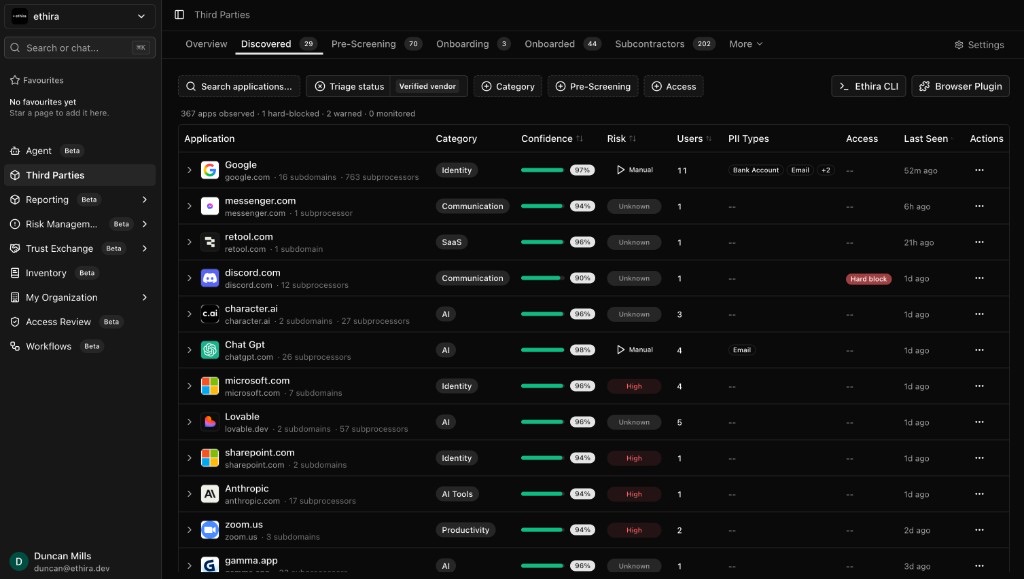
The Discovered tab surfaces tools spotted across your environment — the early-warning system for shadow IT. Each row shows the application, how confident Ethira is, a risk verdict, who's using it, and which kinds of personal data have been seen going to it.
- AI triageA "likely genuine" or "likely noise" badge helps you work the queue fast. It's advisory — Ethira never onboards or hides anything for you.
- Auto pre-screeningThe first time a new tool crosses the threshold, a pre-screen kicks off on its own. Watch for the verdict in the risk column.
- Pull from your toolsConnect integrations like Vanta to sync the vendors they already track straight into your portfolio.
- Slack alertsGet a heads-up in a channel of your choice whenever someone starts using a tool that isn't onboarded yet.
Questionnaire library
Manage every due-diligence template — and the responses that come back — from one place under Third Parties → Settings → Questionnaires.
Start from a curated template
Select + New template to adopt a ready-made question set, including:
- DORA ComplianceBuilt for EU digital operational resilience.
- Third-Party SecurityCore vendor security review.
- GDPR DPIAData protection impact assessment.
- SOC 2 & ISO 27001Trust criteria and Annex A controls.
- Cloud Security PostureFor cloud and infrastructure vendors.
- AI & Model GovernanceFor vendors with AI in the loop.
Build your own
Open the editor to create a template from scratch or tweak a copy. Add sections and questions in whatever format fits — multiple choice, short answer, paragraph, dates, and more. Editing a template never touches questionnaires you've already sent, so past records stay exactly as they were.
Send & track answers
This is where the time-savings live. Ethira drafts answers for you, shows what's still missing, and keeps the back-and-forth with vendors tidy.
Let AI do the first pass
From a vendor's Questionnaires section, Ethira can fill in answers using the documents you've uploaded plus public research — each with a confidence score and a citation so you can check the source. You stay in control: review each answer and accept or edit it, or accept all in one go. Anything you've accepted is preserved if you re-run later.
See the gaps at a glance
Gap analysis splits a questionnaire into answered and outstanding, with a coverage percentage and an outstanding count — so you always know exactly what's left and who to chase.
Close the loop with the vendor
- Send outstanding questionsEmail the vendor only the questions still open, using a message Ethira pre-fills with the right contacts.
- Paste their replyWhen a vendor answers by email, paste it in and Ethira matches their responses to the open questions for you.
- Re-run anytimeRefresh unaccepted answers from the vendor's latest documents — your accepted answers stay put.
To watch progress across the whole portfolio, the Filled questionnaires view lets you search by vendor and filter by template, status, or reviewer — from not started, through in progress, to completed and reviewed.
Map your supply chain
Your vendors have vendors. Ethira draws the whole picture so you can see dependencies and weak points before they become problems.
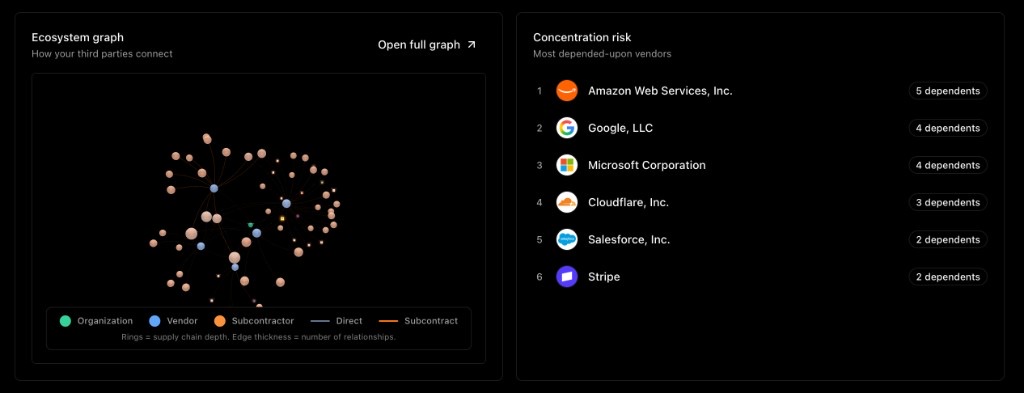
- Dependency graphAn interactive map of your organization, your direct vendors, and their subcontractors. Zoom, pan, and click any node to open the details.
- Concentration riskA ranked list of the vendors that many parts of your ecosystem rely on — your potential single points of failure.
- Subcontractors (fourth parties)Track who your vendors rely on. Add links yourself, or just ask the Agent to connect them.
- Ultimate parentsRoll vendors up to their parent companies for group-level reporting.
Third-party risk register
All your vendor-linked risk lives under Risk Management → Third Party, with views for every way you'll want to slice it.
- ActiveYour day-to-day working list of open risks.
- My & TeamRisks assigned to you, or across your colleagues.
- SuggestedAI-proposed risks waiting for your approval.
- ClosedResolved risks, kept for the record.
Per-vendor risk reports
Open a vendor's Risk analysis section for an AI-generated picture — a forecast, the monitoring feed, and a clear breakdown of where risk sits. Reports reflect the most recent analysis, which runs automatically as part of onboarding and refreshes as new documents, fresh questionnaire answers, or external events come in.
Import and connect risks
Already track risk in a spreadsheet? Import it and Ethira extracts and enriches each item for you to accept or reject. From any risk, you can link the vendor and the assets it affects — products, systems, datasets — and manage mitigations and residual risk from the same place. You can also tailor your own risk statuses so the lifecycle matches how your team actually works.
TPRM settings
One hub, under Third Parties → Settings, controls how your vendor program runs. Here's what you'll find:
- Onboarding approversWho signs off on new vendors — workspace-wide or per onboarding.
- Reassessment scheduleHow often vendors at each risk level get re-checked.
- QuestionnairesYour template library and all filled responses.
- Discovered-vendor alertsSlack notifications for shadow-IT detections.
- Bulk importAdd many vendors at once from a spreadsheet.
- Custom dashboardReorder your Third Parties overview to suit your team.
Get help & what's next
The Agent is the fastest way through almost any of this — it knows your portfolio and can act on your behalf. A few prompts that fit this work well:
You're set to run the program
Keep your portfolio clean, your due diligence moving, and your risk register honest — and let Ethira handle the busywork in between.